Tool bar: Pause and Play controls let you stop the simulation at any moment to take a closer look;
 Rewind
takes the simulation back to its initial state; Leave tracks shows
where objects have passed.
Rewind
takes the simulation back to its initial state; Leave tracks shows
where objects have passed.Mouse: Grab objects and pull them around.
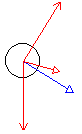 Red arrows show the strength and direction of the
forces on an object.
Red arrows show the strength and direction of the
forces on an object. Thin headed arrows show the individual forces that combine together to give the solid headed resultant force.
A blue arrow shows the speed and direction of an object's velocity.
A green arrow (displayed in some simulations) shows its acceleration.